لم تُترجم هذه الصفحة بعد
تعرض هذه الصفحة النص الإنجليزي حتى تصدر ترجمتها.
Payments
One place for every payment: money received on sales invoices and money paid on purchase invoices. The owner uses it to see who is late; the accountant uses it to close the month against the bank statement.
What you see
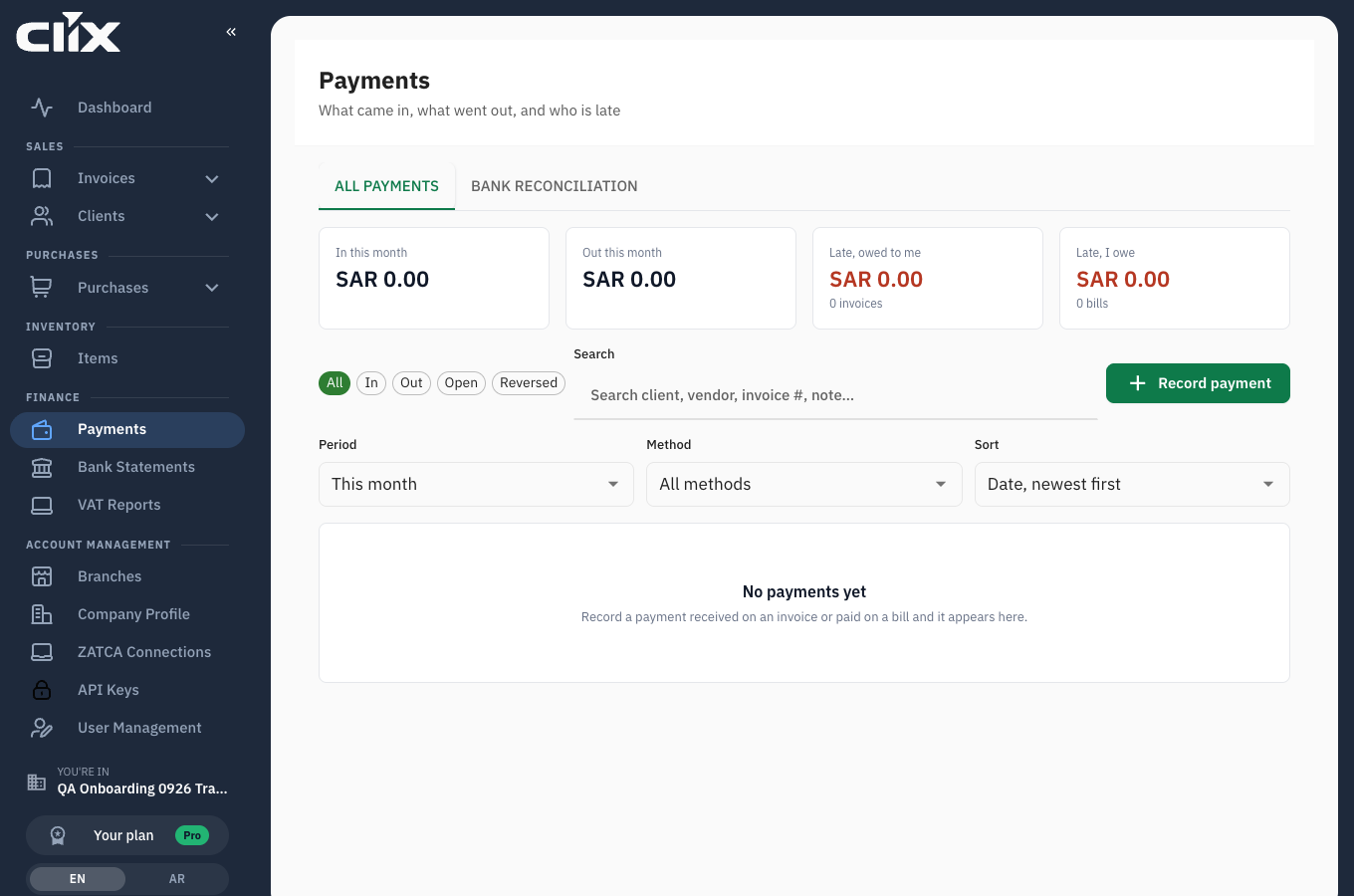
- Tiles, explained in What the tiles count.
- Chips: All, In, Out, Open (not matched to a bank line and not reversed), Reversed.
- Search, Period, Method and Sort:
- Search matches the client or vendor name, the invoice number and the payment's notes, as you type.
- Period: This month (the default), Last 30 days, Last 3 months, Custom. Custom applies once both From and To are set.
- Method: All methods, Cash, Bank Transfer, Credit Card, Debit Card, Cheque, Online Payment.
- Sort: Date, newest first (the default), Date, oldest first, Amount, highest first, Amount, lowest first, Party (A to Z).
- The list: one row per payment, 20 a page. Each row shows the client or vendor, the invoice number for a sales payment, the date, the method, the match state, and the amount: + for money in, − for money out. The ⋯ button (Payment actions) opens the row's menu.
- Record payment.
- Bank reconciliation: the second tab. It appears only for roles that may reconcile.
What the tiles count
| Tile | Counts |
|---|---|
| In this month | Payments received on tax and debit invoices that ZATCA cleared or reported, dated in the period. Credit notes and reversed payments are left out. |
| Out this month | Payments made on bills, plus refunds paid on credit notes, dated in the period. Reversed payments are left out. |
| Late, owed to me | Sales invoices with a balance whose due date has passed, as of today in Riyadh, with the count of invoices. |
| Late, I owe | Bills with a balance whose due date has passed, as of today in Riyadh, with the count of bills. |
The first two follow the Period, and their labels change to "In this period" and "Out this period" for any period other than this month. The two Late tiles ignore the period: they are always as of today. A document without a due date is never late.
Tasks
- Record a payment received
- Record a payment made on a bill
- Send a receipt
- Reverse a payment
- Delete a payment
- Work through the bank statement
Record a payment received
Why. The invoice's payment status and the dashboard's outstanding figure come only from what you record here.
Who. Admin, Accountant, Create invoice.
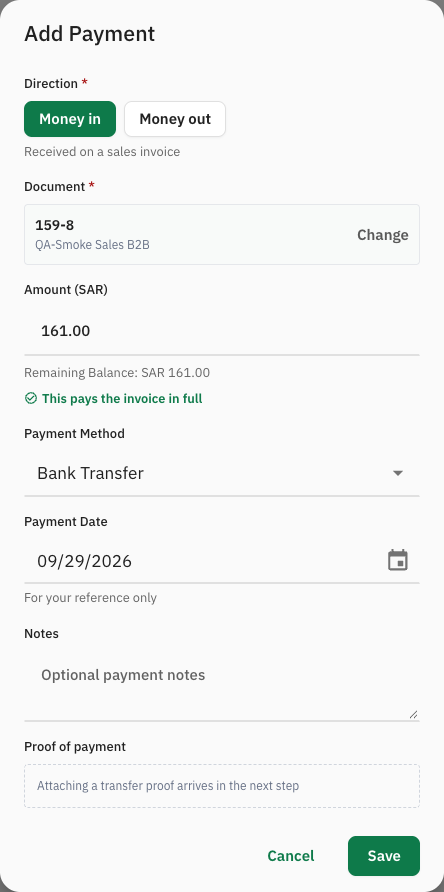
- Click Record payment. The Add Payment dialog opens.
- Leave Direction on Money in ("Received on a sales invoice").
- Under Document, choose the invoice. Tax invoices that are not fully paid are offered; credit and debit notes cannot be chosen. The remaining balance prefills Amount (SAR).
- Change Amount (SAR) if the client paid part. It must be more than 0 and no more than the remaining balance. It is rounded to 2 decimals.
- Set Payment Date to the day the money arrived. It defaults to today.
- Choose the Payment Method: Cash, Bank Transfer (the default), Credit Card, Debit Card, Cheque or Bank Card.
- Add Notes if useful, for example the transfer reference.
- Click Save.
Result. The row appears in the list. The invoice's payment status becomes Partially Paid or Paid. An amount above the balance is refused: "Payment amount cannot exceed the remaining invoice balance."
Foreign-currency invoices
The amount field always reads Amount (SAR), but the amount you enter is in the invoice's currency. For an invoice in USD, enter the USD amount received.
Record a payment made on a bill
Who. Admin, Accountant, Create invoice.
Same as above with Direction on Money out ("Paid on a purchase invoice"). Choose the purchase by its purch# number. Only purchases with a balance are offered, and the balance prefills the amount. The purchase's payment status becomes Partially Paid or Paid. See Purchases and vendors for recording the bill itself.
In the Payments list a bill payment shows the vendor, but not the purch# number.
Send a receipt
Why. The client wants written confirmation that you received their payment.
Who. Admin, Accountant, Create invoice.
A receipt is sent from the invoice, not from the Payments list.
- Open the invoice and go to its Payments section.
- On the payment, click the envelope icon, Send Receipt.
- Type the Recipient Email. Clix does not fill in the client's address. Add CC, BCC, a Subject and a Message if you like, and attach a file (PNG, JPEG or PDF, up to 2 MB).
- Send.
Result. The recipient gets an email with the invoice number, the payment date, method and amount, the payment's notes and your message. The email is in English, and it does not show the remaining balance.
Reverse a payment
Why. A payment was recorded on the wrong invoice, for the wrong amount, or never arrived. Reversing keeps the record of what happened.
Who. Admin, Accountant, Create invoice.
- On the payment's row, click ⋯ and then Reverse payment.
- Type the Reason. Reverse stays disabled until you do.
- Click Reverse.
Result.
- The row stays in the list with its party and amount struck through and the note "reversed" with the date. Hover over it to see the reason.
- The document's balance is restored. For example, a bill paid 30.00 + 50.00 = 80.00 goes back to Partially Paid with 30.00 owed when the 30.00 payment is reversed.
- The payment leaves the tiles. It is excluded from every total.
- If the payment was linked to a bank line, the line returns to Open, unless another payment is still linked to it.
- A reversed row has no ⋯ menu. It cannot be reversed again.
Delete a payment
Who. Admin only.
On the invoice's Payments section, the delete icon removes a payment from the invoice. The dialog says the action cannot be undone. In fact Clix reverses the payment with the reason "deleted", so it stays in the Payments list as a reversed row. Prefer Reverse payment and give the real reason.
Work through the bank statement
Why. Month end means every line on the statement is explained: linked to a payment, or closed as something that is not invoice money.
Who. Admin, Accountant, Create invoice.
- Open the Bank reconciliation tab. The counts at the top show Open, Matched and Not invoice.
- Choose the Statement (the newest 50 are listed), or leave All statements. Create invoice users see only All statements. The chips filter by state, Open (the default), Matched, Not invoice, All, and by direction, In and out, In, Out. Search matches the line's description and remarks.
- Each open line shows up to three suggested invoices or bills underneath it, each labelled exact or likely. Click Link on the right one. If the amounts differ, Clix asks "Link part of this line?"; confirm with Link anyway.
- If no suggestion fits and the line is a bank fee, salary, tax payment, transfer between your own accounts, loan or anything else that is not invoice money, click Not an invoice. Choose the Reason: Bank fee (the default), Salary, VAT or tax payment, Transfer between own accounts, Loan or Other. Add a Note if useful, and click Close line. A closed line can be reopened.
Result. Link creates a payment on that document and marks the line Matched. The payment's amount is the smaller of the line and the document's balance, its date is the line's date, and its method is Bank Transfer. Open counts down; at zero the tab reads "Every line is explained." Uploading statements is in Bank statements.
How suggestions are chosen
Clix scores each open document against the line and shows the top three that score at least 40 points:
| Signal | Points |
|---|---|
| The amount equals the document's balance | 50 |
| Two documents of the same party add up to the amount | 40 |
| The line's text contains the document's number | 40 |
| The amount is within 1% of the balance | 30 |
| The line's text contains the party's name or IBAN | 20 |
| The line is 0–7 days after the document | 10 |
| The line is 8–45 days after the document | 5 |
A line dated before a document's issue date never suggests that document. A suggestion is exact when the balance equals the line amount, otherwise likely. Money coming in suggests sales invoices; money going out suggests bills and refunds on credit notes.
Check a likely suggestion before you link it
A short invoice number such as 29 also counts as found when those digits appear inside a longer reference in the bank text, so an unrelated document can reach 40 points and show as likely. Compare the party and the amount before clicking Link.
flowchart TD
    A[Upload statement] --> B[Open line]
    B --> C{A suggestion fits?}
    C -->|yes, Link| D[Payment created, line Matched]
    C -->|fee, salary, tax, own transfer, loan, other| E[Not an invoice, with reason]
    C -->|no| F[Record the payment with Record payment]
    D --> G{Open count = 0?}
    E --> G
    F --> B
    G -->|no| B
    G -->|yes| H[Every line is explained]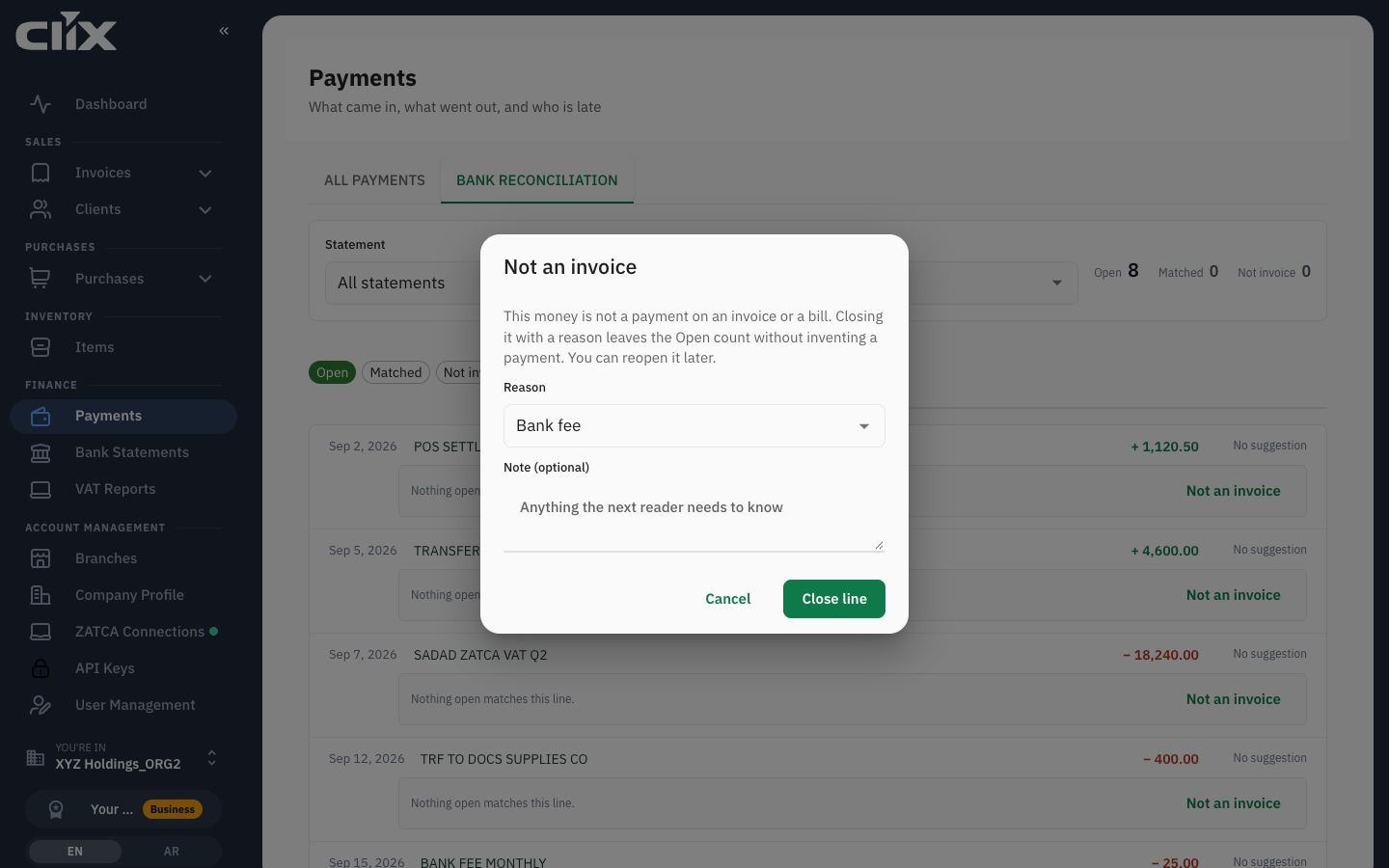
Statuses
On a payment row
| Shows | Meaning |
|---|---|
| matched to the bank line's description | linked to a bank line |
| not matched | no bank line yet |
| reversed and a date | undone; excluded from every total |
On a bank line
| Status | Meaning |
|---|---|
| Open | not explained yet |
| Matched | at least one payment links to it |
| Not invoice | closed with a reason; not money for any invoice |
Limits and plans
Payments and reconciliation are on every plan.
| Action | Admin | Accountant | Create invoice | View invoice |
|---|---|---|---|---|
| See payments and tiles | yes | yes | yes | yes |
| Record, reverse, send a receipt | yes | yes | yes | — |
| Bank reconciliation tab | yes | yes | yes | — |
| Choose a statement on that tab | yes | yes | — | — |
| Delete a payment (on the invoice) | yes | — | — | — |
Questions
The client paid three invoices with one transfer. The app links a bank line to one document. Once one payment is linked, the line is Matched and shows no more suggestions. Link the line to one of the invoices, then record the other two with Record payment; they stay not matched.
The client paid more than the invoice. Clix refuses an amount above the balance. Record the balance, and record the rest when the next invoice exists, or refund it. Advance payments are not supported.
Why is a late figure different from what I expected? An invoice is late when a balance remains and its due date has passed, as of today in Riyadh. An invoice without a due date is never late. Set one on the invoice.
Can I attach the transfer proof to a payment? Not in the app yet: the Add Payment dialog shows a Proof of payment slot that says the upload "arrives in the next step". Until then keep the proof with the bank statement line.
I recorded a payment on a credit note. That is a refund you paid out. It counts in Out, not in In or in collected totals.
I linked the wrong bank line. Reverse the payment. The line returns to Open if no other payment links to it. The app has no separate unmatch.