لم تُترجم هذه الصفحة بعد
تعرض هذه الصفحة النص الإنجليزي حتى تصدر ترجمتها.
Invoice types
Clix issues five kinds of document. Which one you need depends on two questions: is this a new sale or a correction, and who is the buyer?
flowchart TD
    A{"New sale, or a<br/>correction to an issued invoice?"}
    A -->|New sale| B{"Buyer outside<br/>Saudi Arabia?"}
    B -->|Yes, a business| X["<b>Export invoice</b><br/>standard, every line 0%"]
    B -->|No| C{"Buyer a business<br/>or a consumer?"}
    C -->|Business, B2B| S["<b>Standard tax invoice</b><br/>ZATCA clears it first"]
    C -->|Consumer, B2C| P["<b>Simplified tax invoice</b><br/>ZATCA is told after"]
    A -->|Correction| D{"Buyer owes<br/>less or more?"}
    D -->|Less| CN["<b>Credit note</b>"]
D -->|More| DN["<b>Debit note</b>"]| Document | Issue it when | ZATCA flow | Where in Clix |
|---|---|---|---|
| Standard tax invoice | You sell to a business in Saudi Arabia | Cleared before it is valid | Invoices → Create invoice, Client type B2B |
| Simplified tax invoice | You sell to a consumer | Reported after issue | Invoices → Create invoice, Client type B2C |
| Export invoice | You sell to a business outside Saudi Arabia | Cleared, like a standard invoice | Create invoice, B2B, switch on Mark as export invoice |
| Credit note | The buyer owes less than an issued invoice says | Same flow as the invoice it corrects | Invoice's ⋮ menu → Issue credit or debit note → Credit Note |
| Debit note | The buyer owes more than an issued invoice says | Same flow as the invoice it corrects | Invoice's ⋮ menu → Issue credit or debit note → Debit Note |
The step-by-step tasks are in Invoices and Credit and debit notes. This page explains which one to reach for.
Standard or simplified
ZATCA splits sales in two. A standard invoice goes to a business and is not valid until ZATCA clears it. A simplified invoice goes to a consumer; you hand it over at once and Clix reports it to ZATCA straight after.
| Standard | Simplified | |
|---|---|---|
| Buyer | A business (B2B) | A consumer (B2C) |
| Buyer on the invoice | Required | Optional |
| ZATCA flow | Cleared before it is valid | Reported after issue |
| Typical use | Trade invoices, contracts, services to companies | Shops, restaurants, walk-in customers |
Your ZATCA connection decides first. ZATCA registers each connection for standard invoices, simplified invoices, or both.
- Registered for one type: Clix sets Client type for you and locks it — "Auto-set based on device".
- Registered for both: you choose Client type, B2B or B2C, on each invoice. The Invoice for list then shows only clients of that type.
A connection cannot issue a type it is not registered for. See Devices, certificates and branches.
The buyer's VAT number does not choose the type
A B2B client need not be VAT-registered. Clix issues a standard invoice to a business without a VAT number; ZATCA only needs the number when the buyer has one.
Example: a standard invoice
Al-Noor Trading, a VAT-registered company in Riyadh, buys 10 laptops at 3,000 SAR each.
| SAR | |
|---|---|
| 10 × 3,000, standard rated | 30,000.00 |
| VAT 15% | 4,500.00 |
| Total | 34,500.00 |
Choose Client type B2B, pick Al-Noor under Invoice for, add the line, and issue. Clix sends it to ZATCA; it is valid once its status reads Cleared.
Example: a simplified invoice
A walk-in customer buys two coffees at 11.50 SAR each, VAT included.
| SAR | |
|---|---|
| 2 × 10.00, standard rated | 20.00 |
| VAT 15% | 3.00 |
| Total | 23.00 |
Choose Client type B2C. Invoice for is optional — leave it empty for an anonymous customer. The customer gets the invoice at once; its status becomes Reported after Clix tells ZATCA.
Export invoice
An export is a sale to a business outside Saudi Arabia. It is a standard invoice with every line zero-rated.
Before you start. The client's Country must be outside Saudi Arabia. Clix then treats the client as foreign and turns VAT Registered off. There is no separate "non-resident" setting.
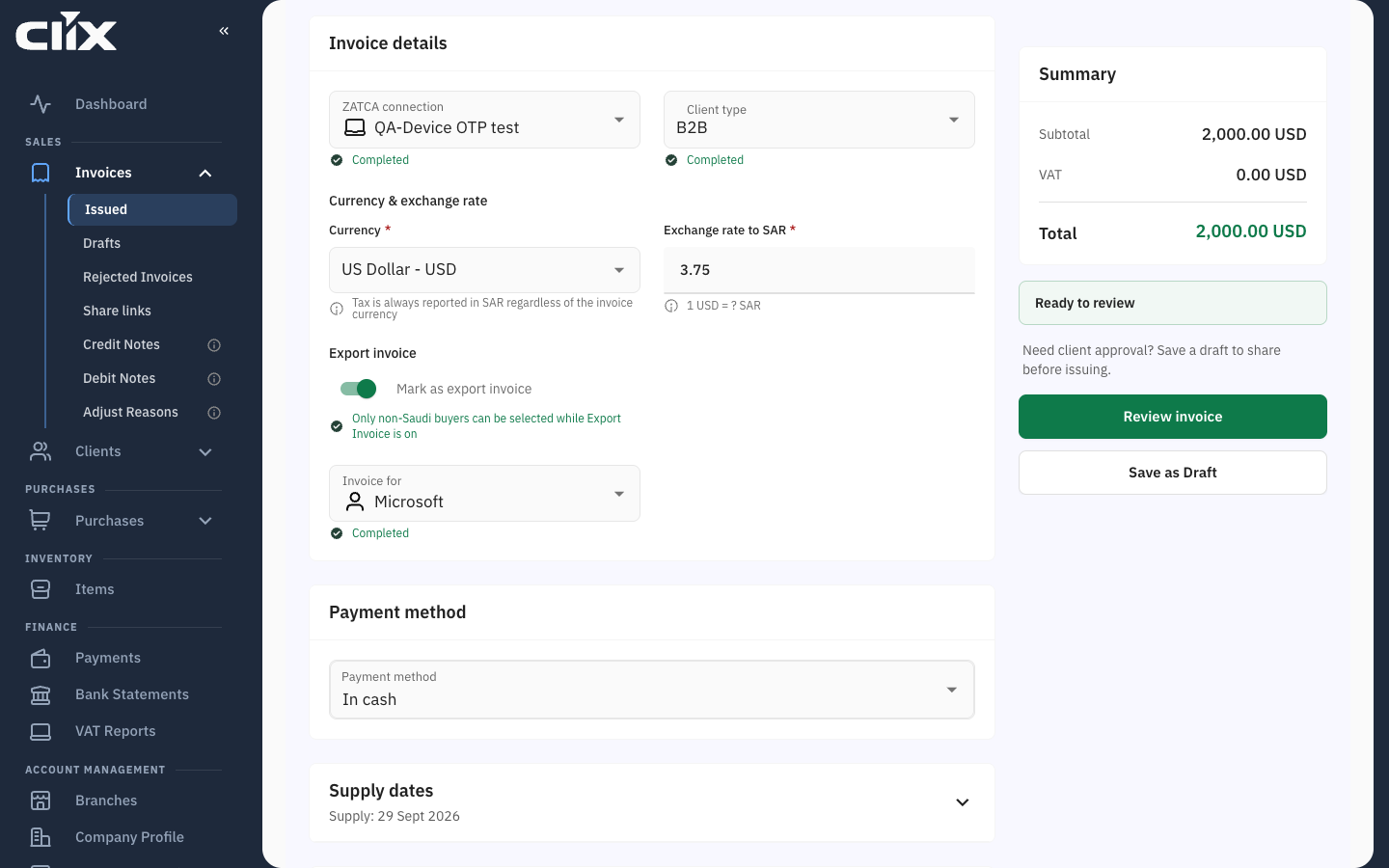
On the invoice, choose Client type B2B and switch on Mark as export invoice — "Zero-rates every line and sends the export transaction code to ZATCA". Then:
- Invoice for lists only foreign clients — "Only non-Saudi buyers can be selected while Export Invoice is on".
- Every line becomes Zero rated, 0%, with reason
VATEX-SA-32for goods orVATEX-SA-33for services. You cannot change it line by line. - You may invoice in another currency. Enter the Exchange rate to SAR; for a foreign currency it cannot be 1.
The line list may still show the category you picked
With export on, a line you added as Standard Rated still reads S 15 in the line list. The Summary and Review invoice show VAT 0.00, and that is what ZATCA receives.
Example: an export of services
Gulf Design LLC in Dubai buys a 2,000 USD consulting package. Rate 3.75.
| USD | SAR | |
|---|---|---|
Consulting, zero rated, VATEX-SA-33 |
2,000.00 | 7,500.00 |
| VAT 0% | 0.00 | 0.00 |
| Total | 2,000.00 | 7,500.00 |
flowchart LR
    A["Client Country:<br/>United Arab Emirates"] --> B["Create invoice<br/>Client type B2B"]
    B --> C["Mark as export invoice"]
    C --> D["Every line Z, 0%<br/>VATEX-SA-32 goods<br/>VATEX-SA-33 services"]
    D --> E["ZATCA clears it"]
Zero-rated is not exempt
An export is zero-rated: the supply is taxable at 0%, and you may reclaim related input VAT. Exempt supplies are outside VAT and generally you may not. Clix picks the right category for exports; for other lines, ask your accountant if unsure.
Credit and debit notes
A cleared or reported invoice cannot be edited or deleted. You correct it with a note that points at it.
| Credit note | Debit note | |
|---|---|---|
| Use it when | The buyer owes less: a return, a late discount, an overcharge, a cancellation | The buyer owes more: an undercharge, an extra service, a price rise |
| Corrects | One or more tax invoices from the same buyer and ZATCA connection | One tax invoice |
| Limit | Cannot exceed what is left of the original after earlier credit notes | None |
| Reason | Required | Required |
The rules Clix holds every note to:
- The original must be a tax invoice that ZATCA has cleared or reported. A note cannot correct another note.
- The note keeps the original's type, standard or simplified, and its buyer and ZATCA connection.
- A reason is required — ZATCA prints it on the note. Reasons come from your own list under Invoices → Adjust Reasons; the list starts empty. See Manage the list of reasons.
- The note's currency matches the original's.
flowchart LR
    A["Tax invoice<br/>Cleared or Reported"] -->|buyer owes less| B["Credit note<br/>up to what is left"]
    A -->|buyer owes more| C["Debit note"]
    B --> Z{"ZATCA"}
    C --> Z
Example: a return
Al-Noor returns 2 of the 10 laptops. In Invoices → Issued, open the original invoice's ⋮ menu, click Issue credit or debit note, choose Credit Note — "Reduce invoice amount" — and pick the reason Returned goods.
| SAR | |
|---|---|
| 2 × 3,000, standard rated | 6,000.00 |
| VAT 15% | 900.00 |
| Credit | 6,900.00 |
Al-Noor now owes 27,600 SAR. A later credit note on the same invoice can take at most that.
Example: a missed delivery fee
You forgot a 500 SAR delivery fee on the laptop invoice. Open the invoice's ⋮ menu, click Issue credit or debit note, choose Debit Note — "Increase invoice amount" — and pick the reason Missed charge.
| SAR | |
|---|---|
| Delivery, standard rated | 500.00 |
| VAT 15% | 75.00 |
| Debit | 575.00 |
Example: cancelling an invoice
There is no delete. Issue a credit note for the full amount with a cancellation reason. Both documents stay on record and net to nothing.
Dates on every document
| Date | Who sets it | Rule |
|---|---|---|
| Issue date and time | Clix, from the Riyadh clock, at the moment of issue | You cannot back-date or forward-date an invoice |
| Supply date | You — "The date the goods or services were delivered" | Defaults to today |
| Supply end date | You — for delivery that spans more than one day | Not before the supply date |
VAT categories
Every line carries a category, not just a rate:
| Code | Category | Rates | Needs a reason |
|---|---|---|---|
S |
Standard rated | 5% or 15% | No |
Z |
Zero rated | 0% | Yes |
E |
Exempt from VAT | 0% | Yes |
O |
Not subject to VAT | 0% | Yes — free text |
Zero-rated and exempt lines need a VATEX-SA-… reason code. There are sixteen, covering exports, education, healthcare, military and more. "Not subject to VAT" takes your own wording instead of a code.
An ordinary invoice may mix categories line by line. An export invoice may not: every line is zero-rated.
Document codes
ZATCA identifies each document by a code. You see them in the API and in the XML, not on screen.
| Code | Document |
|---|---|
388 |
Tax invoice — standard, simplified or export |
381 |
Credit note |
383 |
Debit note |
386 |
Advance payment invoice — API only; see Reference data |
Related
- ZATCA e-invoicing in Clix
- Invoices
- Credit and debit notes
- Reference data — the code lists as the API returns them