لم تُترجم هذه الصفحة بعد
تعرض هذه الصفحة النص الإنجليزي حتى تصدر ترجمتها.
ZATCA e-invoicing in Clix
Saudi Arabia's Phase 2 e-invoicing requires invoices to be produced by an accredited system, cryptographically signed, and sent to ZATCA. Clix is that system. This page explains what happens when you press Submit.
Two flows, not one
Which flow an invoice takes depends on who is buying, and the difference matters:
flowchart LR
    A["You submit"] --> B{"Buyer type"}
    B -->|Business, B2B| C["<b>Clearance</b><br/>ZATCA approves first"]
    B -->|Consumer, B2C| D["<b>Reporting</b><br/>issue now, Clix reports it<br/>straight after"]
    C --> E["Cleared"]
D --> F["Reported"]| Clearance | Reporting | |
|---|---|---|
| Applies to | Standard invoices (B2B) | Simplified invoices (B2C) |
| Timing | Before the invoice is valid | After issue. ZATCA allows 24 hours; Clix sends it straight away |
| Final status | Cleared |
Reported |
| If ZATCA refuses | You have no valid invoice | You have an invoice ZATCA rejected |
A shop cannot wait for approval at the till, so consumer invoices are issued immediately and reported afterwards. A business invoice is not valid until ZATCA has cleared it.
What Clix does for you
On submit, Clix builds the UBL 2.1 XML, applies the cryptographic stamp and digital signature using the device's certificate, generates the QR code, and sends it to ZATCA. The response is stored against the invoice.
You never handle XML, keys or hashes. What you are responsible for is the accuracy of the content — the VAT number, the address, the VAT category on each line — because Clix signs and submits exactly what you entered.
How Clix checks an invoice
Clix checks an invoice three times. The first two happen before anything reaches ZATCA, so most mistakes surface while you can still fix them.
flowchart LR
    A["<b>1. As you type</b><br/>the form"] -->|Review invoice| B["<b>2. On Review invoice</b><br/>ZATCA's rules,<br/>run by Clix"]
    B -->|Issue| C["<b>3. At ZATCA</b><br/>clearance or<br/>reporting"]
    A -.->|"field error<br/>under the field"| A
    B -.->|"one error<br/>at a time"| A
C -.->|"Rejected or<br/>warnings"| D["Credit note,<br/>then reissue"]| Check | When | What it catches | What you see |
|---|---|---|---|
| 1. The form | As you type | Missing fields, supply end date before the supply date, exchange rate, prices and quantities, Arabic-only names, the VAT number's format | A message under the field, e.g. "Supply Date must be less than or equal to Supply End Date" |
| 2. Review invoice | When you click Review invoice — before issue | ZATCA's business rules, which Clix runs itself: dates, document type, the credit or debit reason and reference, currency, VAT categories and exemption reasons, allowances, totals, export rules. Also whether your ZATCA connection may issue this type and its certificate is valid | A red message naming the first rule that failed. Fix it and review again. If every rule passes, the Preview invoice dialog opens with Issue invoice to ZATCA |
| 3. ZATCA | After you issue | Anything ZATCA's own checks find | The invoice's status: Cleared or Reported, Rejected, or accepted with warnings |
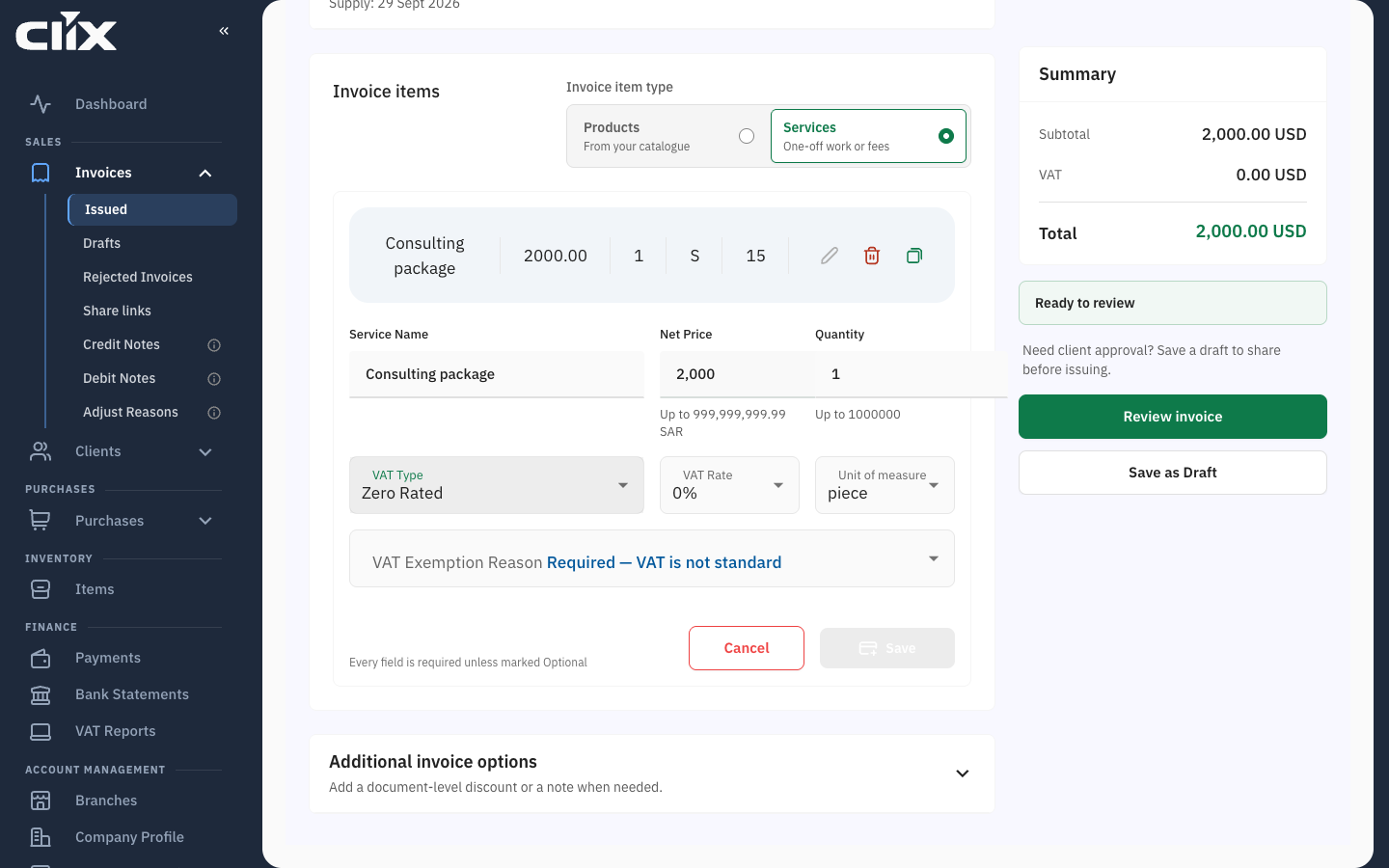
Check 1 at work: choose Zero Rated and the form asks for a VAT Exemption Reason before it lets you save the line.
Totals are worked out by Clix, not by your browser. Each line, discount and total you see on the form comes from the same code that builds the invoice, so the Preview invoice dialog matches what ZATCA receives.
The credit-note limits run at issue, not at review. A credit note that takes more than is left on the original passes the review and is refused when you issue it.
One error at a time
The review stops at the first rule an invoice breaks. An invoice with two problems shows the second only after you fix the first.
What check 3 still catches. Clix does not run ZATCA's own validator on the signed XML before sending it. Rules ZATCA checks that Clix's copy does not are found only at step 3. The result arrives on the invoice, not as a message on screen:
-
Rejected. The invoice moves to Invoices → Rejected Invoices with ZATCA's reasons listed. It is not valid; see ZATCA rejections.
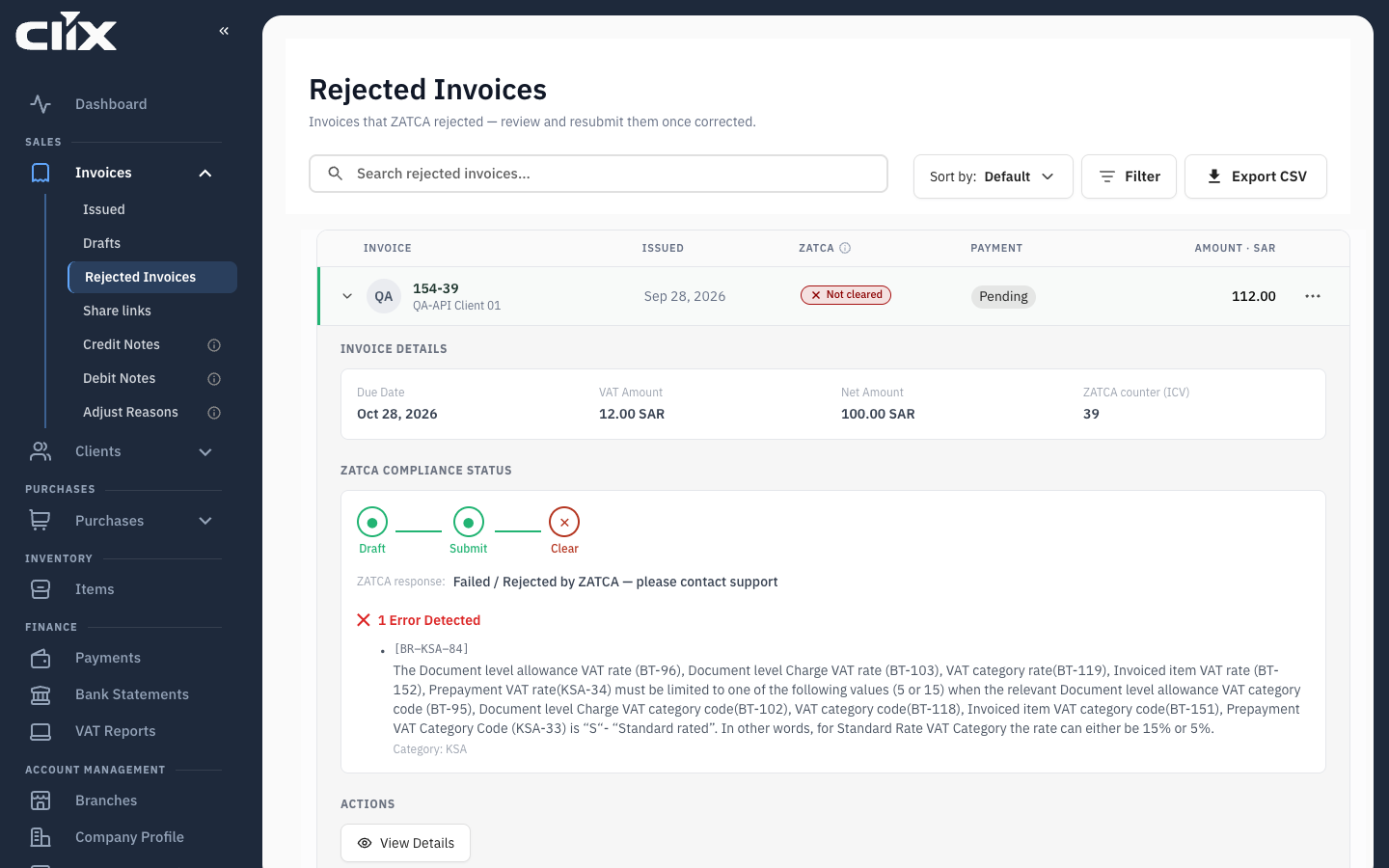
Here ZATCA refused a line at a 12% VAT rate (rule
BR-KSA-84: standard rate must be 5% or 15%). Clix's review did not catch it — an example of what only check 3 finds. -
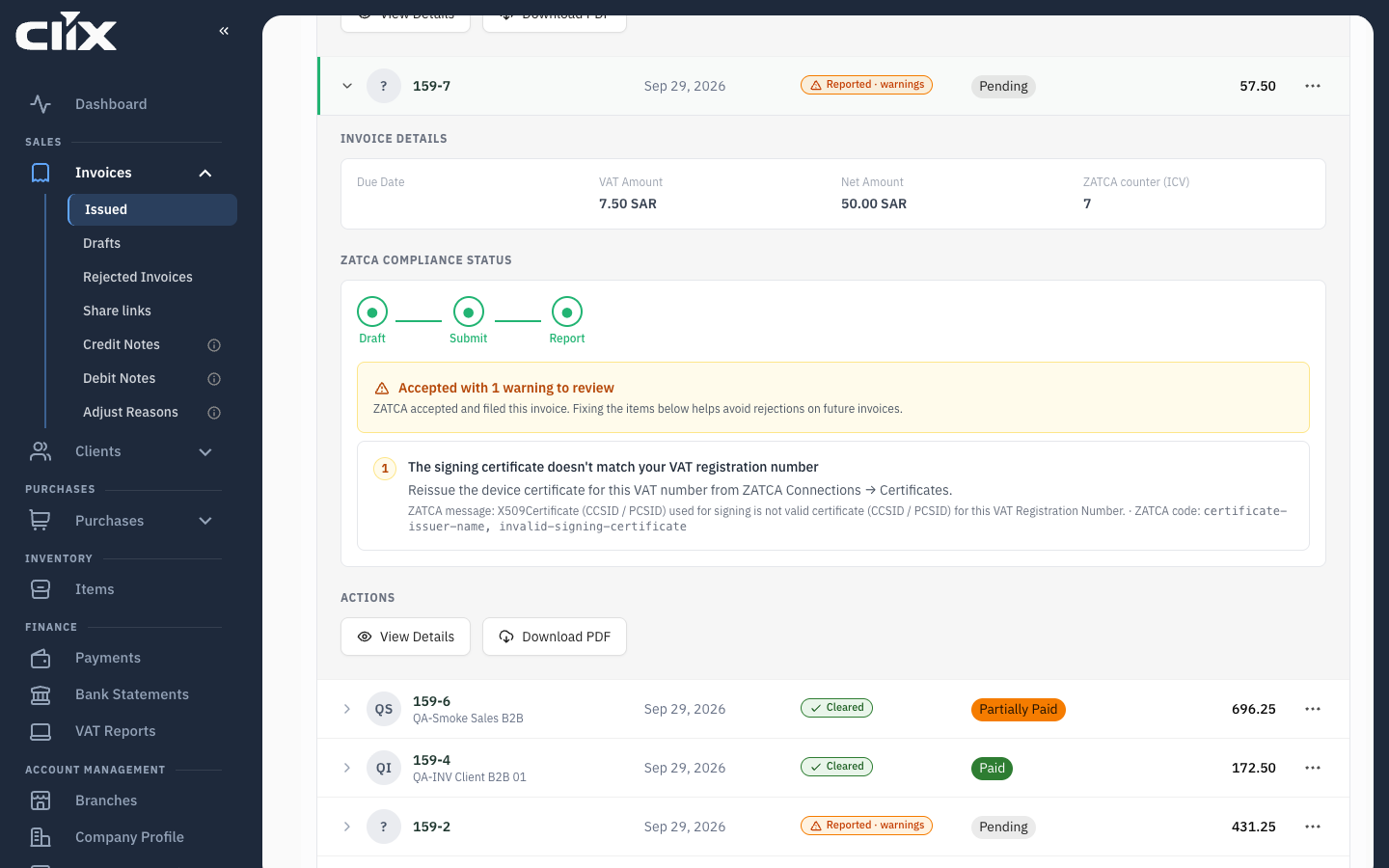
Accepted with warnings. "Accepted with 1 warning to review" — "ZATCA accepted and filed this invoice. Fixing the items below helps avoid rejections on future invoices."
Check the client once, not on every invoice
The buyer's address and VAT number are checked when you save the client, not when you issue. Validate VAT Number on the client form opens ZATCA's public taxpayer lookup; Clix does not look the number up itself. Get the client right once and every invoice to them starts clean.
Why it is asynchronous
Submission is a call to a government service. Clix accepts your invoice, queues it, and reports the outcome when ZATCA answers. That is why an invoice briefly shows as pending before it becomes Cleared or Reported.
Through the API this is explicit: POST /api/invoices/ returns 202 Accepted and a location to poll.
Warnings are not rejections
ZATCA can accept an invoice and attach warnings. Clix shows this as a distinct state — the status plus · warnings in amber, rather than red.
A warning means the invoice is valid and accepted, but something in it is not ideal. Read them; they are usually the early notice of something that will become a rejection.
Warnings are easy to miss on a phone
The mobile invoice card shows accepted and accepted-with-warnings identically. Check warnings on a full screen.
Once it is cleared, it is permanent
A cleared or reported invoice cannot be edited or deleted — not by you, not by support. Corrections are made by issuing a credit or debit note against it.
This is the point of the system rather than a limitation of it: the archive is trustworthy precisely because nobody can rewrite it.
The device is what ZATCA registered
ZATCA registers a device, not a company, and the device's certificate signs the invoice. No device, no invoices — and an expired certificate stops invoicing until it is renewed. See Devices, certificates and branches.
Related
- Invoice types
- ZATCA rejections — what to do when one is refused
- Devices and certificates