لم تُترجم هذه الصفحة بعد
تعرض هذه الصفحة النص الإنجليزي حتى تصدر ترجمتها.
API keys
Where an Admin creates and revokes the keys that authenticate calls to the Clix REST API.
Business plan only
REST API access is on the Business plan. On Free and Pro this screen reads "API access is a Business plan feature" and shows a View plans button instead of the key list. See Plans, limits and fair use.
Who. Admin only. No other role sees API Keys in the sidebar.
What you see
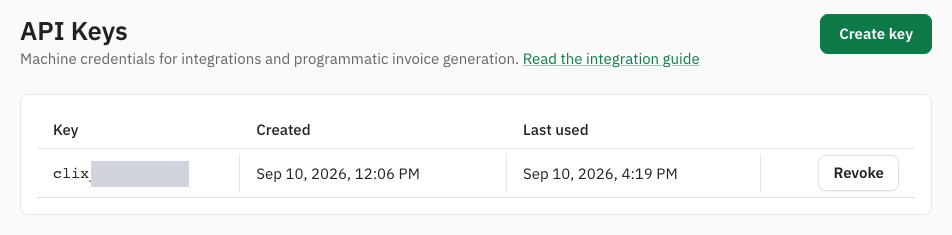
- Create key: opens the Create API key dialog.
- Key: the start of each key,
clix_and a few characters. The full key is never shown again after it is created. - Created and Last used: Last used reads Never until the key makes its first call.
- Revoke: stops the key.
The list does not show the key name. Note which prefix belongs to which system when you create the key.
A key's life
flowchart LR
    A["Create key"] --> B["Copy your key now<br/>shown once"]
    B --> C["Your system calls<br/>the Clix API with it"]
    C --> D{"Leaked, lost or<br/>no longer needed?"}
    D -->|"Replace it"| E["Create key<br/>for the new one"]
    E --> F["Revoke key<br/>on the old one"]
    D -->|"Stop it"| F
There is no rotate button. To rotate a key, create the new one, switch your system to it, then revoke the old one.
Tasks
Create a key
Why. Your own system needs to issue or read invoices without a person signing in.
Who. Admin, on the Business plan.
- Open API Keys and click Create key.
- Enter a Key name that says where it will be used, for example "ERP integration".
- Choose the Access level.
- Click Create key.
- Copy the key from Copy your key now.
- Click I have stored it.
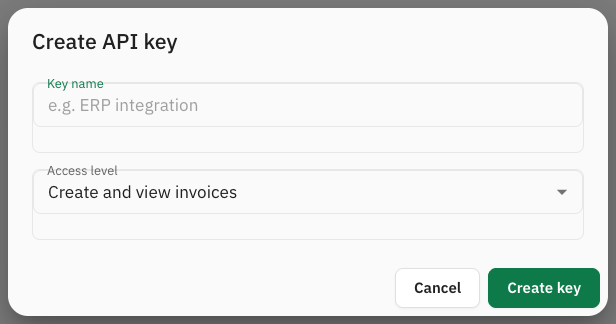
| Access level | For |
|---|---|
| View invoices (read-only) | Reporting tools that only read |
| Create and view invoices | A system that issues invoices. The default. |
| Accountant (invoices, notes, reports) | A system that also needs credit and debit notes and reports |
Result. The key is active immediately and calls the API on behalf of your organisation.
Store it safely
The key is shown once. "This is the only time the full key is shown. Store it somewhere safe — we keep only a hash and cannot show it again." If it is lost, revoke it and create another.
Anyone holding the key can act for your organisation at its access level. Treat it as a password:
- never commit it to a repository or paste it into a ticket;
- give each system its own key, so one can be revoked without stopping the others;
- revoke it at once if you suspect it has leaked.
Revoke a key
Who. Admin.
- On API Keys, click Revoke on the key's row.
- In Revoke this key?, click Revoke key. Keep key closes the dialog without revoking.
The dialog names the key by its prefix and warns that any integration using it "will stop working within a minute. This cannot be undone."
Result. "Key revoked", and the key leaves the list. A call with it answers 401 Invalid or revoked API key. Invoices already issued with the key are unaffected: they are real invoices and stay cleared or reported.
Limits
API calls are rate limited per minute. A call over the limit answers 429. See Usage and quotas and Errors and rate limits.
If your organisation leaves the Business plan, every key stops working on its next call with 403 API access is not included in your current plan. The keys are not revoked: they work again when API access returns, and you can still list and revoke them meanwhile.
Related
- Authentication and API keys: how to use the key in a request
- Quickstart
- Plans, limits and fair use