Subscription and billing
Where an Admin sees the current plan, changes it, and finds the bank details for payment. No other role can change the plan.
What you see
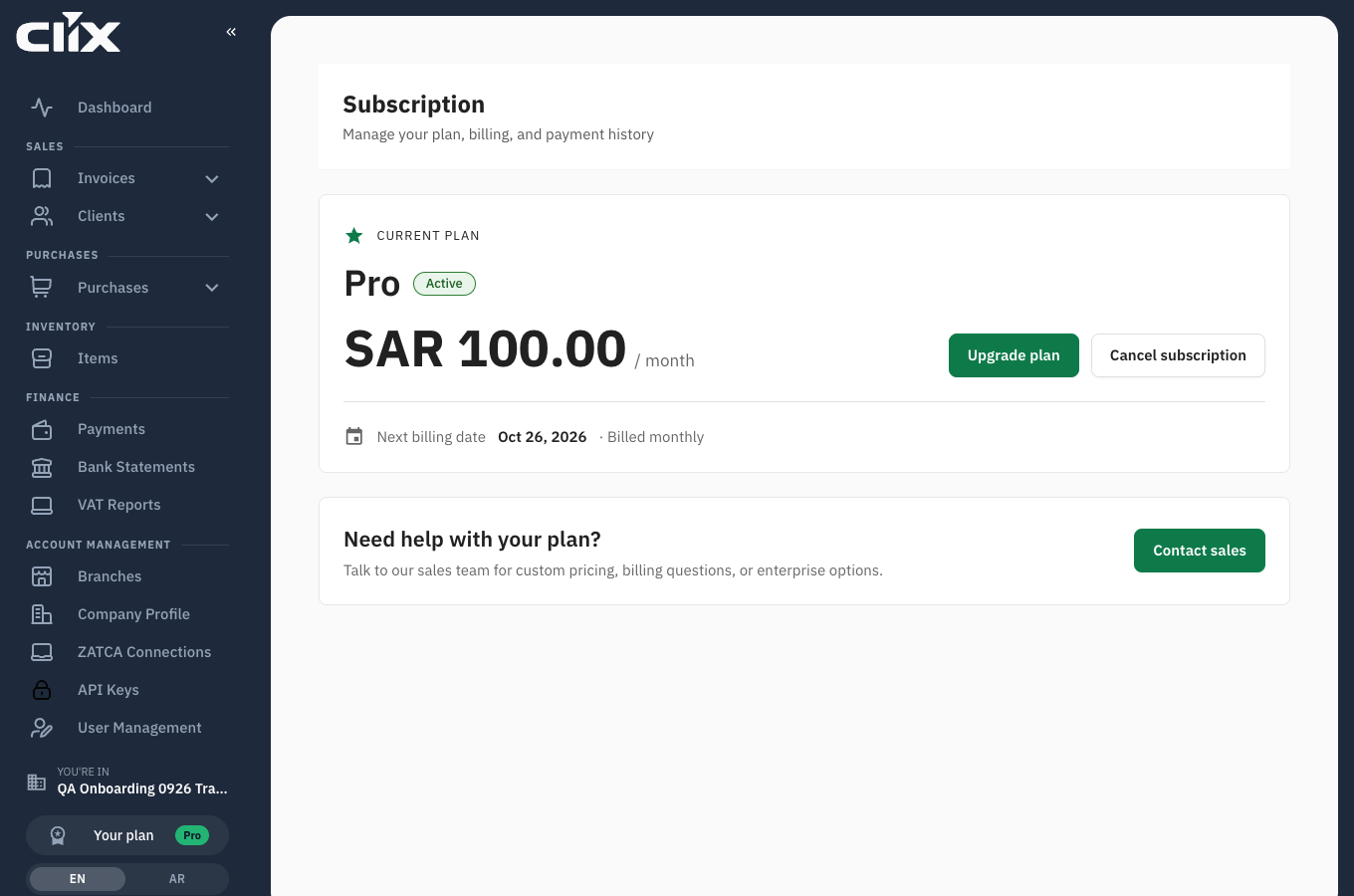
- Current plan: the plan name, an Active badge, and the monthly or annual price.
- Upgrade plan: goes to the pricing page. Cancel subscription appears on paid plans.
- Next billing date: the date of the next payment. On the Free plan this reads Not available, because there is no billing.
- Contact sales: for custom pricing or questions the page does not answer.
How to get here
There is no Subscription entry in the sidebar. Open it by clicking the plan chip — the small "Your plan / Free" block near the bottom of the sidebar.
Tasks
- Upgrade to a paid plan
- Pay by bank transfer
- Send your transfer receipt
- Switch between monthly and annual
- Cancel
Upgrade to a paid plan
Why. You have reached the invoice limit, or you need the REST API.
Who. Admin.
- Click the plan chip in the sidebar to open Subscription.
- Click Upgrade plan.
- Pick Monthly or Annual, then Choose Pro or Choose Business.
- Click Confirm.
Result. The plan is active straight away. The bank details appear, and the same details arrive by email.
flowchart TD
    A[Confirm on the pricing page] --> B[Plan active straight away<br/>bank details on screen and by email]
    B --> C[Transfer the total including VAT<br/>with the CLX- reference]
    C --> D{Arrives within seven days?}
    D -->|yes| E[Matched: confirmation email<br/>with allowance and next payment date]
    D -->|no| F[Organisation returns to Free<br/>nothing deleted]
    F -->|money arrives later| E
Pay by bank transfer
Why. Clix is paid by transfer, not by card.
Who. Admin, or whoever runs your banking.
The dialog and the email both carry the same details:
| Field | What it is |
|---|---|
| Total to transfer | The price including 15% VAT — SAR 115.00 for a Pro month |
| Beneficiary | TAJROBAT AZM FOR INFORMATION TECHNOLOGY |
| Bank | Al Rajhi Bank |
| IBAN | The account to pay into |
| Reference | CLX- followed by eight characters — put this in the transfer note |
| Pay by | Seven days from the upgrade |
The dialog has copy buttons for the total, the IBAN and the reference.
The amount is not the plan price
The plan is SAR 100 a month; the transfer is SAR 115.00, because VAT is added. The subscription page shows the price without VAT. Always transfer the total shown in the dialog or the email.
If the transfer does not arrive in seven days. The organisation returns to Free. Nothing is deleted — your invoices, clients, items and devices are untouched — and the paid plan resumes as soon as the money arrives.
Send your transfer receipt
Who. Admin.
Reply to the bank-details email with the receipt attached, or send it to support@goclix.ai quoting the reference.
Result. Once the transfer is matched you receive a confirmation email stating the amount received, your new monthly invoice allowance, the next payment date and the reference.
Switch between monthly and annual
Who. Admin.
Use the Monthly / Annual switch on the pricing page before choosing a plan. Annual saves about 17%.
Cancel
Who. Admin.
Cancel subscription is on the subscription page. Your organisation returns to the Free plan and its 15-invoice monthly allowance. Nothing is deleted.